
Most guides connect an AI agent to Odoo with an API key. That key carries every right of the user behind it, so a bug, a bad prompt or a prompt injection can reach far beyond the one task you had in mind. This article is for business owners and IT staff who want AI agents (LLM agents, n8n workflows, scripts) to prepare work in Odoo without being able to publish, delete or read customer data. We show the pattern and the open-source module we built for it.
The module is open source (LGPL-3): AI Agent Gateway on GitHub. It targets Odoo 19 and depends only on website_blog and mail.
The problem: an API key is too much power
Odoo 19's External JSON-2 API authenticates every request with a user's API key, sent as a Bearer token, and the documentation states that all operations are validated against the access rights, record rules and field accesses of that user. An API key is therefore only as narrow as the user behind it. If that user can publish pages, edit accounting or read contacts, so can anything holding the key.
An AI agent is a poor fit for that level of trust, because it acts on text. If it reads an e-mail, a web page or a document containing hidden instructions, those instructions compete with yours. OWASP lists prompt injection and excessive agency among the top risks for LLM applications. The remedy is not a cleverer prompt but a smaller set of things the agent is able to do.
For automated use, the Odoo documentation recommends dedicated bot users with only the minimum required permissions. That works for simple cases, but access rights are made for people and are hard to shrink down to "may create unpublished blog drafts and nothing else". A different approach is to put a narrow door in front of Odoo.
The pattern: a narrow gateway with a fixed list of actions
The gateway exposes a small HTTP API. The agent sends POST /ai-agent-gateway/v1/<action> with a JSON body and a Bearer token. The agent can only call the actions you granted it, plus me, which returns its own permissions; other actions are rejected. Publishing, deleting and other models have no action at all, and requests for blogs outside the agent's scope are refused.
One token and explicit capabilities per agent
Each agent is a record in Odoo with its own token. You tick the capabilities it needs:
- Read posts:
tagsandposts.search. The search is limited to the blogs you select and to whitelisted fields;tagsreturns the names of all blog tags. - Create and edit drafts:
posts.createandposts.write. - Attachments:
attachments.list,attachments.readandattachments.create, for images and private HTML backups on its own drafts plus files you explicitly share with it. - Send mail:
mail.send, to one fixed recipient.
The token is shown once and Odoo stores only its SHA-256 hash. If it leaks, you replace or revoke it with one click, or archive the agent. Because the token belongs to one agent with minimal rights, the damage of a leak stays small.
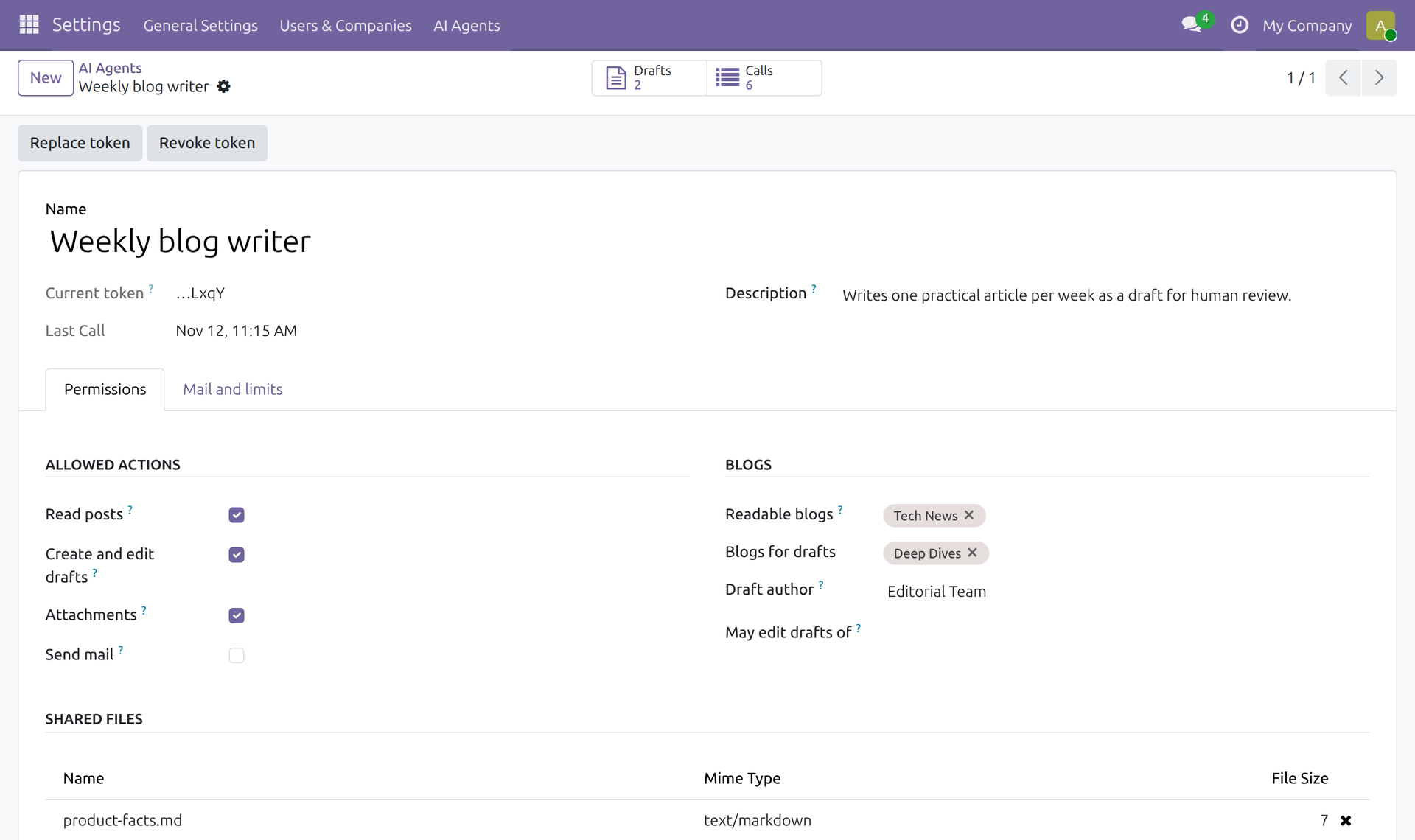
One record per agent: capabilities, blogs, shared files and token.
Drafts only, and only its own
New posts are always created unpublished. The agent may only send whitelisted fields; anything else, such as is_published, author_id, website_id or active, is rejected with HTTP 400. An agent can edit only drafts created by an agent, namely its own or those of agents you list under "May edit drafts of", and only while they are unpublished. Human-written posts are out of reach for writing.
Sanitizing, upload checks and a fixed mail recipient
- HTML: content is sanitized with Odoo's
html_sanitize, which removes scripts, event handlers,javascript:links and inline styles. Cover settings are validated against a whitelist. This limits the XSS risk if injected text ends up in a post. - Uploads: only JPEG, PNG, WebP and HTML are accepted. Images are checked against their file signature (for WebP only the RIFF header), the maximum size is 8 MB and file names are made safe. HTML files are never public.
- Mail: recipient and sender are fixed in Odoo, so the agent cannot choose them, and there is a limit per agent and 24 hours.
Rate limits and the call log
Each agent has a sliding requests-per-hour limit; when it is hit the gateway answers HTTP 429, which stops a runaway loop. Every authenticated call that reaches an action, accepted or rejected, is logged with action, HTTP status, IDs, post title or mail subject, error message and IP address. Post bodies, mail bodies and file contents are not logged. Logs are deleted after 90 days by default, configurable through the system parameter ai_agent_gateway.log_retention_days.
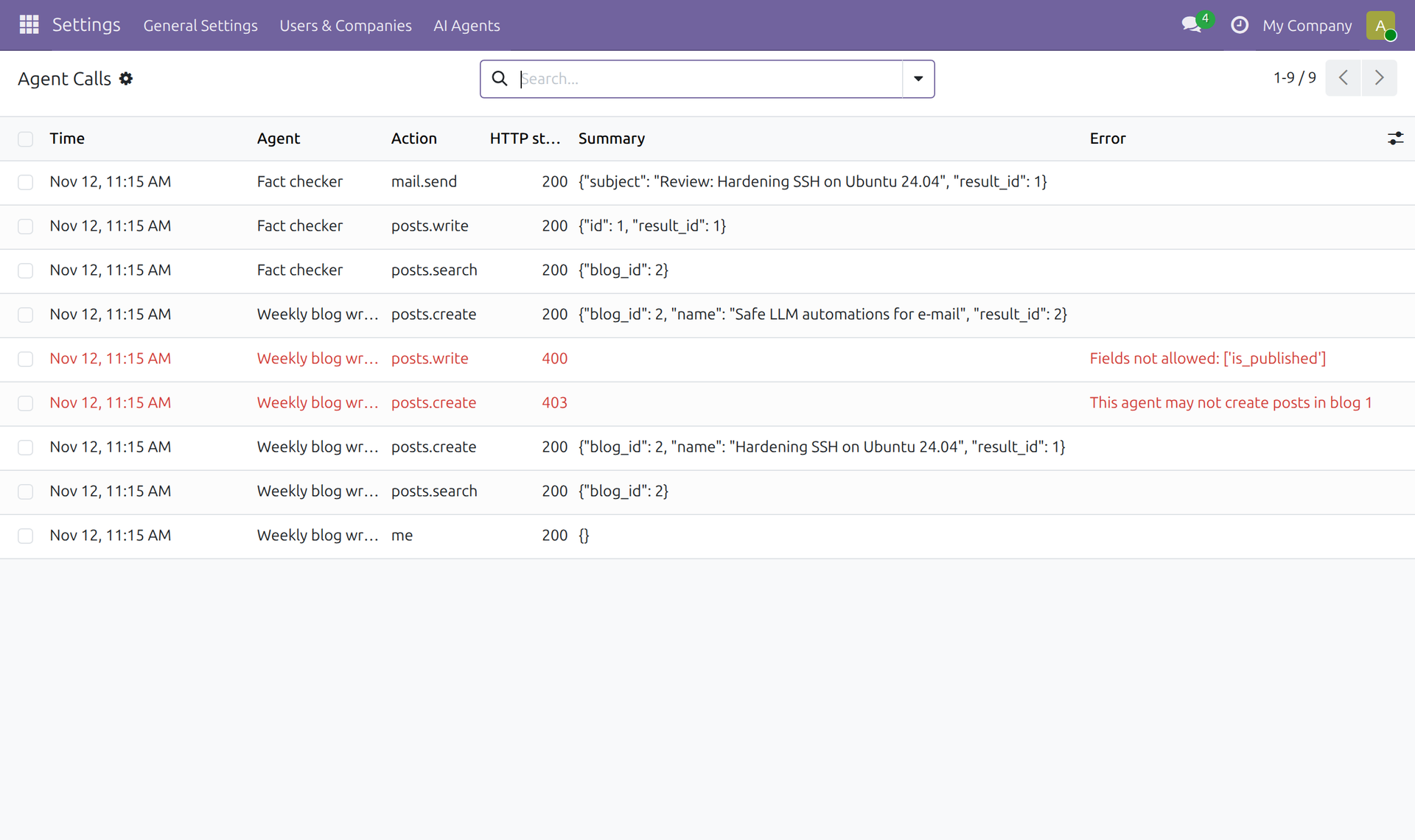
Every call is logged; rejected calls are shown in red.
Trying it
After installing the module, create an agent under Settings → AI Agents → Agents → New, tick its capabilities, choose its blogs and generate the token. Then check the setup with the me action, which returns the agent's own permissions:
curl -s https://<your-odoo>/ai-agent-gateway/v1/me \
  -H "Authorization: Bearer $AGENT_TOKEN" \
  -H "Content-Type: application/json" -d '{}'
If the server hosts several databases, add the header X-Odoo-Database: <db name>. Creating a draft from Python needs only the standard library:
import json, os, urllib.error, urllib.request

def gateway(action, payload=None):
    req = urllib.request.Request(
        f"{os.environ['ODOO_URL']}/ai-agent-gateway/v1/{action}",
        data=json.dumps(payload or {}).encode(),
        headers={"Content-Type": "application/json",
                 "Authorization": f"Bearer {os.environ['AGENT_TOKEN']}"},
        method="POST")
    try:
        return json.load(urllib.request.urlopen(req, timeout=60))["result"]
    except urllib.error.HTTPError as e:
        raise RuntimeError(f"{action}: HTTP {e.code} {e.read().decode()[:500]}") from None

draft = gateway("posts.create", {"blog_id": 2, "name": "Example title", "content": "<p>...</p>"})
print("Draft for review:", draft["website_url"])
In n8n, use an HTTP Request node with POST, the action URL, Generic Header Auth (name Authorization, value Bearer <token>) and a JSON body. For LLM agents, hand over the action table, the blog IDs and the rule "you create drafts, a human publishes". Provide the token as an environment variable or secret, never inside the prompt.
Writer and reviewer: a human publishes
The module's README suggests two agents with two tokens:
- Writer: searches existing posts to avoid duplicates, creates a draft and uploads images.
- Reviewer (with "May edit drafts of: Writer"): reads the newest draft, checks facts and links, stores the original as a private HTML backup, corrects the draft and sends one summary mail.
The editor reads the mail, opens the draft and decides whether to publish. The two-agent split gives you a second look without giving either agent the final say. Related reading on the same principle: our articles on prompt injection in e-mail automations and invoice intake with an LLM.
What the gateway does not protect
A narrow door is not a vault. The README is explicit about the limits:
- Actions run with
sudo(), so Odoo access rights and record rules do not apply. The module's own checks are the only barrier, which is why the action list should stay small. - A readable blog exposes all its posts to the agent, including unpublished drafts written by humans.
- An agent can overwrite human edits on drafts it may edit, as long as they are unpublished.
- Images uploaded with
public: trueare reachable by URL before the post is published. - A new token stays in a transient wizard record until you click "I have stored the token" or Odoo vacuums transient records; closing the dialog with the cross leaves it there until then.
- The logged IP is the proxy's address unless Odoo runs with
--proxy-mode. - Invalid tokens are logged as warnings with the client IP (suitable for fail2ban) but are not rate-limited by the module.
The gateway does not replace normal Odoo hardening such as HTTPS, a reverse proxy, backups and updates. It removes the need to hand an AI agent a full API key.
Checklist
- Never give an agent a full-privilege API key; one token per agent.
- Tick only the capabilities and blogs the agent really needs.
- Keep the human in the last step: agents create drafts, people publish.
- Use a separate reviewer agent where a second check helps, and limit which drafts it may edit.
- Store tokens in a secret store, never in prompts, and replace them if in doubt.
- Review the call log, especially rejected calls.
- Run Odoo behind HTTPS and a reverse proxy; enable
--proxy-modeso logged IPs are meaningful. - Mind the limits above: use
public: truefor images only if early reachability is acceptable.
Our take
The safest permission is the one that does not exist. We built the gateway because agents are useful for preparing work, but publishing and deleting should stay with people. It is a small, auditable module rather than a complete security product, and we recommend reviewing the code before you use it.
The module is open source (LGPL-3): AI Agent Gateway on GitHub.
Want to work out the right AI use cases with your team? Our AI workshop for SMEs covers use cases and EU AI Act obligations – on-site or online.